
Last updated: November 2026 · By Sajjad, founder of 8Sonics
Quick answer: most small businesses need five types of schema markup. LocalBusiness (using your most specific business type), Organization and WebSite details for your brand, Service on each service page, BreadcrumbList, and Article on blog posts. Google says its AI features need no special schema, so treat schema as a clear record of your business facts that keeps you eligible for rich results. Skip FAQ and HowTo markup if you’re hoping for a rich result: Google no longer shows either one.
Schema markup is one of those jobs that gets sold as either a secret weapon or a waste of time. For a small business it’s neither. It’s a short block of code that tells search engines who you are, where you work and what each page is about. Done once and done right, it takes an afternoon.
The problem is that most advice online is out of date. Many guides still promise FAQ dropdowns in Google that stopped appearing in May 2026, or share code that breaks when you paste it. This guide covers what Google supports today, which five types to add, copy-paste code you can edit, and how to set it up in WordPress with free tools. It’s part of our guide to getting recommended by ChatGPT, Google AI Overviews and Perplexity.
Not sure what schema your site has now? On a free 30-minute strategy call, we’ll run your pages through Google’s test with you and tell you what to fix. Book your free strategy call
What is schema markup?
Schema markup is code that labels the facts on your page so search engines don’t have to guess. Your page might say “Open Mon–Fri, 8 to 6” in plain text. Schema tells Google, in a format it reads directly, that those are your opening hours, that the number at the top is your phone, and that the business is a plumber in Austin.
It uses a shared vocabulary from Schema.org, and the most common format is JSON-LD: a block of code that sits in the page and that visitors never see. Google recommends JSON-LD because it’s the easiest to add and maintain.
Does schema markup still matter in 2026?
Yes, but for fewer things than it used to. Google has retired many of the special search features schema used to unlock. What’s left still matters, and schema still helps Google understand your business, but don’t expect it to change how your listing looks in most searches.
Here’s where things stand, based on Google’s own documentation changelog:
| Still supported in Google Search | Retired or limited |
|---|---|
| Local business details (knowledge panel) | FAQ rich results: no longer shown since May 7, 2026 |
| Organization details (name, logo, contact info) | HowTo rich results: removed in 2023 |
| Article details for blog posts | Breadcrumbs: desktop results only since January 2025 |
| Product and review snippets (for products, not for reviews of your own business) | Course info, estimated salary, vehicle listing and a few others: removed in 2025 |
One rule hasn’t changed: Google doesn’t guarantee any rich result, even when your markup is perfect. Valid schema makes you eligible. Google decides what to show.
Does schema help you show up in AI search?
Not directly. Google says plainly that you don’t need it for AI features. In its guide to optimizing for generative AI search, Google says structured data “isn’t required for generative AI search, and there’s no special schema.org markup you need to add.” It also says it’s “a good idea to continue using it” as part of normal SEO, because it helps with rich result eligibility.
So schema is not an AI shortcut, the same way an llms.txt file isn’t. What gets a local business named in AI answers is mostly the same work covered in our guide to showing up in Google AI Overviews: clear answers on your pages, a complete Business Profile, steady reviews and other trusted sites that mention you. Schema’s job is to make your basic facts unmistakable while that work happens. It’s one small part of answer engine optimization (AEO), not the whole thing.
Which 5 schema types does a small business need?
These five cover almost every small business website. Add them in this order.
1. LocalBusiness, using your most specific type
This is the core record of your business: name, address, phone, hours, website and, for service-area businesses, the cities you serve. Google’s LocalBusiness documentation lists name and address as required, and says to “use the most specific LocalBusiness sub-type possible.” So a plumber uses Plumber, a dentist uses Dentist, and a roofer uses RoofingContractor, not just LocalBusiness.
The details must match your Google Business Profile exactly: same name, same phone format, same hours. If they don’t, fix the mismatch first. Our Google Business Profile checklist covers every field.
2. Organization and WebSite
Organization markup describes your brand: name, logo, social profiles and contact details. WebSite markup tells Google your site’s name. Both belong on your home page. If customers never visit you and you don’t serve a set area, as with an online-only business, use Organization instead of LocalBusiness.
3. Service on each service page
Service markup describes one service, such as “water heater installation,” and who provides it. Put it only on that service’s page, so each page tells Google something different.
4. BreadcrumbList
Breadcrumbs show where a page sits on your site (Home › Services › Drain Cleaning). Most SEO plugins add this automatically once you turn breadcrumbs on.
5. Article on blog posts, with the author
Article (or BlogPosting) markup on each post includes the headline, dates and author. Link the author to a real person, usually the owner, with a short bio page.
Which schema goes on which page?
Each page should describe what’s actually on that page. One of the most common mistakes is copying the same block onto every page. Use this as your map:
| Page | Schema to use |
|---|---|
| Home page | LocalBusiness subtype (or Organization) + WebSite |
| Each service page | Service, linked to your business |
| Each location page (multi-location businesses) | Its own LocalBusiness block with that location’s address and phone |
| Blog posts | Article or BlogPosting with author |
| Every page except the home page | BreadcrumbList |
Which schema do I need for my type of business?
Start with the row that matches you. “Free Rank Math” means you can set it up with the free version of the Rank Math SEO plugin for WordPress.
| Business | Main type to use | Also add | Free Rank Math? |
|---|---|---|---|
| Plumber, HVAC, roofer, electrician | Plumber, HVACBusiness, RoofingContractor or Electrician | Service on each service page; areaServed for your cities | Yes, except areaServed (paste your own code) |
| Dentist or medical practice | Dentist or MedicalClinic | Service for each treatment | Yes |
| Restaurant or cafe | Restaurant or CafeOrCoffeeShop | Menu URL, hours | Yes |
| Shop or online store | Store (if you have a shop) | Product on each product page | Yes |
| Lawyer, accountant, agency | LegalService, AccountingService or ProfessionalService | Service on each service page | Yes |
| Online-only business (no visits, no set service area) | Organization | Service on service pages | Yes |
| Several locations | One LocalBusiness block per location page | Service on service pages | No, multiple locations need Rank Math PRO; paste your own code instead |
Not sure which row fits your business? We’ll look at your site and tell you exactly which types to add. Book your free strategy call
Can you give me an example of LocalBusiness schema?
Here’s a complete example for a plumber that serves several cities. Copy it, replace every value with your own details, and keep the punctuation exactly as it is. A single missing comma or curly quote will break it.
<script type="application/ld+json">
{
  "@context": "https://schema.org",
  "@type": "Plumber",
  "@id": "https://www.example.com/#business",
  "name": "Example Plumbing Co.",
  "url": "https://www.example.com/",
  "telephone": "+1-512-555-0142",
  "image": "https://www.example.com/images/team-photo.jpg",
  "priceRange": "$$",
  "address": {
    "@type": "PostalAddress",
    "streetAddress": "123 Main St",
    "addressLocality": "Austin",
    "addressRegion": "TX",
    "postalCode": "78701",
    "addressCountry": "US"
  },
  "geo": {
    "@type": "GeoCoordinates",
    "latitude": 30.26715,
    "longitude": -97.74306
  },
  "openingHoursSpecification": [
    {
      "@type": "OpeningHoursSpecification",
      "dayOfWeek": ["Monday", "Tuesday", "Wednesday", "Thursday", "Friday"],
      "opens": "08:00",
      "closes": "18:00"
    },
    {
      "@type": "OpeningHoursSpecification",
      "dayOfWeek": "Saturday",
      "opens": "09:00",
      "closes": "14:00"
    }
  ],
  "areaServed": [
    { "@type": "City", "name": "Austin" },
    { "@type": "City", "name": "Round Rock" },
    { "@type": "City", "name": "Cedar Park" }
  ],
  "sameAs": [
    "https://www.facebook.com/exampleplumbing",
    "https://www.yelp.com/biz/example-plumbing-austin"
  ]
}
</script>
Illustrative example: the business, address and phone number above are made up to show the format.
What to change:
- @type: your most specific business type, such as Dentist, Electrician or Restaurant.
- name, telephone, address, url: exactly as they appear on your Google Business Profile.
- geo: your latitude and longitude. Google asks for at least 5 decimal places. You can copy them by right-clicking your location in Google Maps.
- openingHoursSpecification: one block for each set of days with the same hours.
- areaServed: the cities you actually serve. Don’t list a city that conflicts with your address or that you don’t really cover.
- sameAs: links to your real profiles, such as Facebook, Yelp or your BBB page.
Before you publish, paste the code (without the first and last script lines) into the Schema.org validator to check for errors.
How do you add schema in WordPress for free?
The free version of Rank Math covers most small businesses. Here’s the setup:
- Business details: go to Rank Math SEO → Titles & Meta → Local SEO. Choose Organization, pick your Business Type from the list (choose the most specific one), then fill in your name, logo, address, phone, opening hours and price range.
- Blog posts: under Titles & Meta → Posts, set the default schema to Article, then choose Blog Post.
- Service pages: open a service page in the editor, open the Rank Math panel, go to Schema → Schema Generator, choose Service and fill in the service name and description.
- Breadcrumbs: go to Rank Math SEO → General Settings → Breadcrumbs and turn them on.
Two limits of the free version: it has no field for areaServed, and it supports one location only. If you need either, paste your own JSON-LD block (like the example above) with a free header-code plugin, and remove the business details from Rank Math’s Local SEO settings so you don’t end up with two conflicting business records.
How do you test your schema?
Use two free tools, then keep an eye on Search Console.
- Google’s Rich Results Test: paste your page URL. It shows which Google-supported features your markup qualifies for, and any errors.
- Schema.org Markup Validator: checks everything else, including types Google doesn’t show as rich results, such as Service.
- Google Search Console: the Enhancements section shows errors across your whole site over time.
Skip Google’s old Structured Data Markup Helper. It hasn’t kept up with what Google supports today.
What does this look like on a real site?
Here’s what our own site, 8sonics.com, uses. We’re a remote agency, not a shop customers visit, so the home page carries Organization markup rather than LocalBusiness. Each service page has Service markup, each blog post has BlogPosting with the author linked to his profile, and our inner pages carry breadcrumbs. All of it is set up with free Rank Math.
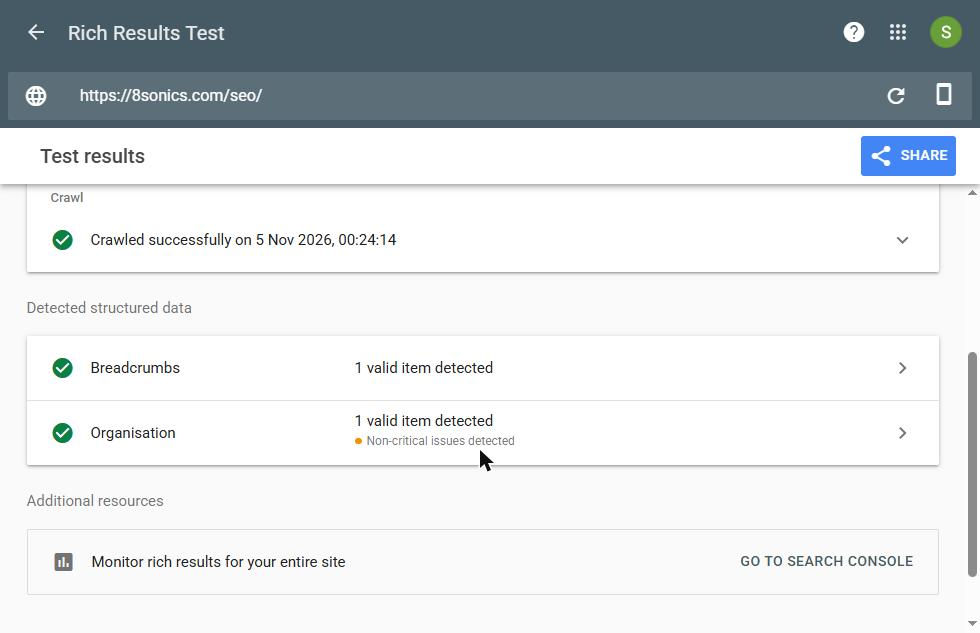
When we ran our SEO services page through Google’s Rich Results Test, it found two valid items: Breadcrumbs and Organization. The Service markup doesn’t appear there because Google has no Service rich result, which is exactly why you also check with the Schema.org validator. The two warnings were optional address fields, not errors.
For one home services client, adding LocalBusiness schema was part of a wider cleanup with their Business Profile, reviews and directory listings. You can see that work in our local SEO case study.
What schema mistakes should you avoid?
Most problems come from markup that doesn’t match the page. Google’s rule is simple: don’t mark up anything visitors can’t see, and make sure the markup is a true picture of the page.
| Mistake | Why it’s a problem |
|---|---|
| Adding review stars for your own business | Google says a business that controls reviews about itself isn’t eligible for star ratings on LocalBusiness or Organization markup |
| Relabeling services as “products” to get stars | It misrepresents the page, which goes against Google’s guidelines and can lead to a manual action |
| The same business block copied onto every page | Every page sends the same signal; service and location pages should describe themselves |
| Business details that differ from your Google Business Profile | Mismatched names, phones or hours make your business harder to verify |
| Two plugins (or a plugin and a theme) both adding schema | You end up with duplicate or conflicting business records |
| Adding FAQ markup only to get dropdowns in Google | Google stopped showing FAQ rich results on May 7, 2026 |
A manual action for bad markup removes your eligibility for rich results, but Google says it doesn’t affect how your pages rank. Still, there’s no upside to cutting corners here.
FAQ
Does schema markup improve Google rankings?
Not directly. Schema helps Google understand what your page and business are, and makes you eligible for rich results, but Google doesn’t guarantee those results. Content, your Business Profile, reviews and links matter far more for rankings.
Do I need special schema for ChatGPT or Google AI Overviews?
No. Google says structured data isn’t required for its generative AI features and there’s no special markup to add. Standard schema is still worth having as part of normal SEO. To get named in AI answers, focus on the signals ChatGPT actually uses: reviews, listings and mentions on trusted sites.
Is FAQ schema still worth adding?
Not for a rich result. Google stopped showing FAQ rich results on May 7, 2026. A visible FAQ section is still useful for readers, and existing FAQ markup does no harm, so there’s no rush to remove it.
Should I use LocalBusiness or Organization schema?
Use the most specific LocalBusiness type if customers visit you or you serve a defined local area. Use Organization if you’re online-only or serve customers everywhere. Either way, pick the type that matches how your Google Business Profile describes you.
Can I get review stars for my own business with schema?
No. Google doesn’t show star ratings when a business marks up reviews about itself on LocalBusiness or Organization markup. Review stars are for sites that review other businesses, or for products. Focus on getting reviews on your Google Business Profile instead, where they show up in the map results.
Is the free version of Rank Math enough?
For a single-location business, yes. It covers LocalBusiness details, Service, Article and breadcrumbs. Multiple locations and custom schema need the paid version, or you can paste your own JSON-LD with a free header-code plugin.
Want your schema checked and fixed?
On a free 30-minute strategy call, we’ll run your key pages through Google’s tests, check them against your Business Profile, and give you a short list of what to fix first. Month-to-month, no long contracts.
Book your free strategy call → · Or explore our SEO services.
